
Private by design.
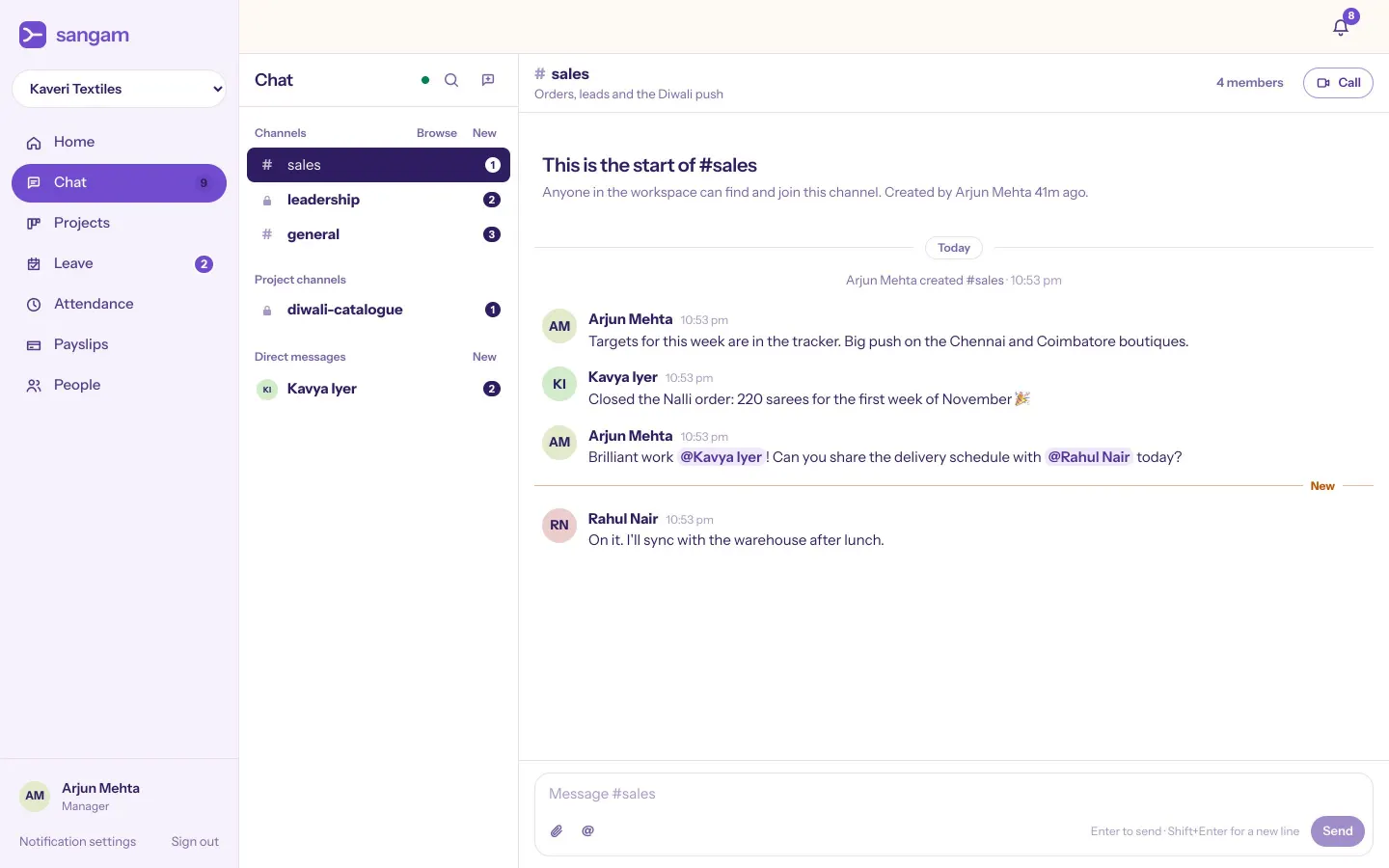
Direct messages and private channels belong to the people in them. Being the owner doesn't change that.
Sangam brings chat, leave, attendance, timesheets, payroll and projects into one login with one record of every person. Built for Indian teams.
Arjun approved Kavya's casual leave. Rahul moved DC-5 to Blocked. Sneha mentioned you in #sales. Meera checked in at 9:42. September payroll approved. Vikram joined #general. Week 41 timesheet approved. 18 payslips published.

The everyday reality for growing teams
Chat lives in one app. Leave is a spreadsheet. Attendance is a register at the front desk. Payroll is an email to the CA every month.
The same person gets typed in five times, and the five copies slowly disagree. Sangam keeps one record of each person, and every part of the day reads from it.
The Sangam way
Join, change roles or leave once. Chat, leave, payroll and projects all see the same person the moment it happens.
Reporting lines drive every leave request, timesheet and payroll sign-off. Nothing waits in the wrong inbox.
Approved leave lands on attendance, unpaid days become loss of pay, and payroll starts from facts, not a file.
Salaries are for the owner and the payroll roles only. Direct messages belong to the people in them, and owners can't read them.

Six modules, one workspace
Each module is useful on its own. Together they stop your team from keeping the same facts in six places.
No re-typing at any step
Priya invites Kavya as an employee. One email, one role.
Kavya signs up and is already in #general, with her manager set.
She takes two days off. Arjun approves, and they show on attendance.
One day was unpaid, so payroll counts it as loss of pay.
Her payslip appears in her account. Nobody else can see it.
Why Sangam payroll
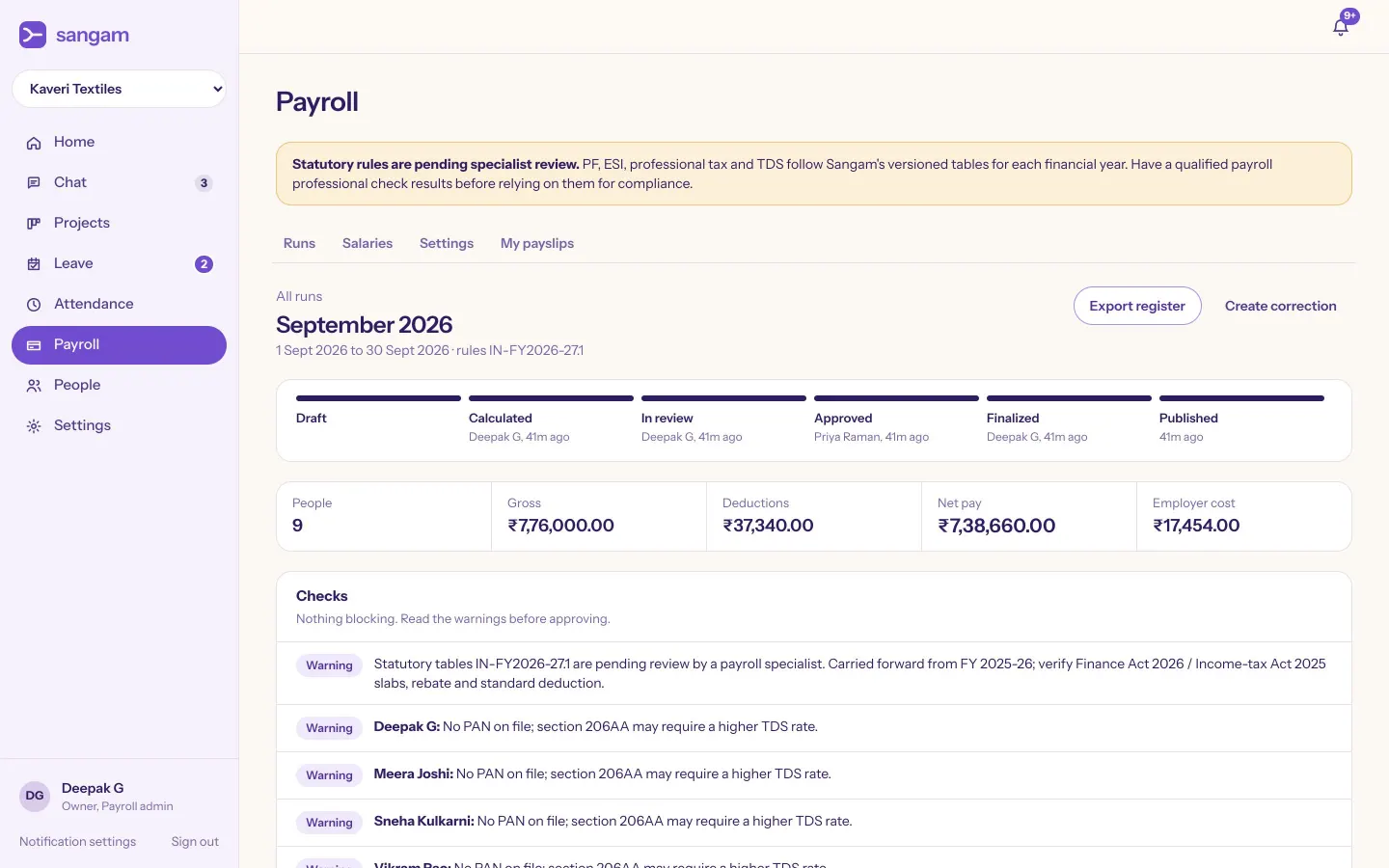
Every run shows its inputs, warnings and per-person working before anyone signs off. Leave and attendance are already in, so you start from facts.
Statutory tables are versioned each financial year. Review your first runs with your payroll advisor before paying from them.
Trust and security
Pay, leave, ID documents and private messages live here, so access was designed first. Each company's workspace is kept apart, and outsiders can't even confirm a record exists.
Direct messages and private channels belong to the people in them. Being the owner doesn't change that.
Admins run the company, not the payroll. Salaries are open only to the owner and the payroll roles you choose.
PAN and bank details are stored encrypted and always shown masked, even on a screen share.
Role changes, approvals and payroll actions are logged with who did it and when.
Pricing
Free while you're small. When you need payroll, it's less than a cup of chai per person a day, with chat included. No card to start, and if you stop paying nothing is deleted.
For a team that's just getting going
₹0forever
Up to 10 people, free for as long as you like.
Run the whole office from one place
₹79per person / month
Any number of people, billed for at least 5, paid yearly.
For companies with more to keep track of
₹149per person / month
Any number of people, billed for at least 5, paid yearly.
Work out your price
Your plan · Team
₹11,376a year, paid once
Saves ₹2,880 a year compared with paying monthly
With priority support · Business
₹21,456 / year
You pay by UPI, card or netbanking. Cancel any time, and nothing is deleted if you stop.
Your first workspace gets 30 days of Team free once you confirm your email, with no card needed (one trial per person and per company). When the trial ends you drop to Free unless you choose a plan: payroll and projects become read-only, and everything stays where it is.
Free for small teams, for as long as you like. Team adds payroll, projects and timesheets, priced per person per month; Business adds priority support and moving your data in. Current prices, and a calculator, are in Pricing above.
Choose a plan in Sangam and pay by UPI, card or netbanking on Razorpay's secure page. Your plan switches on as soon as the payment goes through and renews automatically. Cancel any time, and nothing is deleted if you stop.
You move to Free unless you pick a plan. Nothing is deleted: payslips, projects and history stay readable, and you can upgrade whenever you're ready.
Yes. The Android app checks you in, applies for leave, chats and rings for calls, and the desktop app for Mac, Windows and Linux sits in your tray with notifications. Both are on the downloads page and update themselves. On iPhone, open Sangam in Safari and choose Share, then Add to Home Screen; the iPhone app is coming.
Every run shows its inputs, warnings and per-person working before anyone approves it. The statutory tables are versioned per financial year, and we ask every customer to check their first runs with their payroll advisor.
No. Each workspace is isolated, and every request is checked against the workspace it names. Someone outside your company cannot even confirm a record exists.
Start a voice or video call from any conversation, and turn your camera on or share your screen whenever you like. It rings on the other person's phone and computer for 30 seconds, then shows as a missed call; in a channel it's a huddle anyone in the channel can join. Calendar meetings open in the same call screen, and outside guests join from their browser without an account. Calls run on our own servers in Mumbai, and only the people invited can get in.
Yes. We help you bring in your people, leave balances and the year's salary totals so tax picks up correctly mid-year.
Sangam is in early access with a small group of teams. We onboard each one personally, which is why the first step is a demo.
